


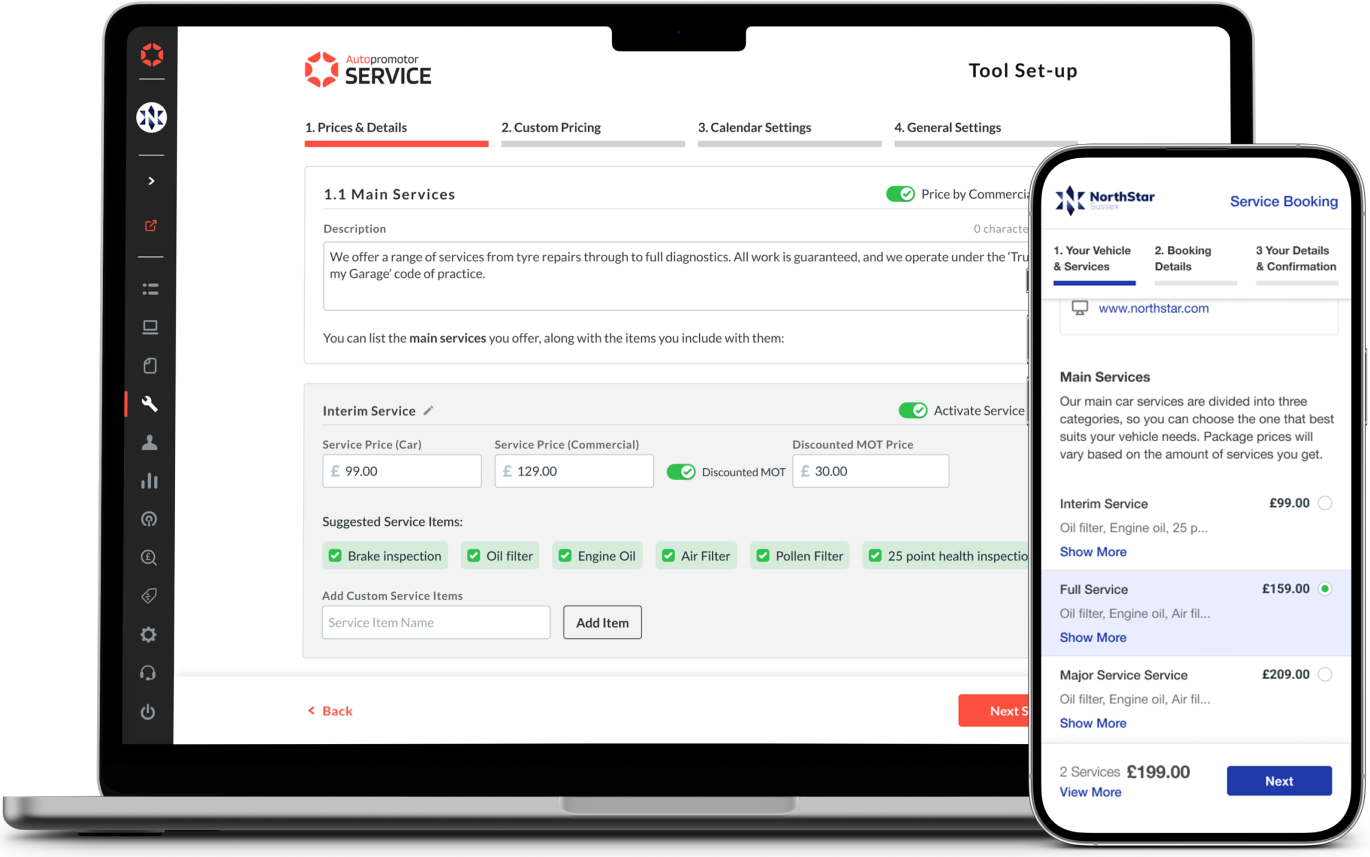
Autopromotor is a dealer management system that allows users to manage their business operations in one place. It allows users to manage stock, choose where to advertise, record sales and purchase information along with detailed access to reports for their sales and website performance.
We always try to improve our users life with the platform. We know that many of our car dealers also offer car services as well as car sales.
This project aimed to help our customers create an auto-customized managing and booking tool that enables them to take service bookings directly through their website.
Autopromotor brand was born in 2018 as a management system for vehicle dealers. This software was designed with the purpose of helping dealers manage their stock, customers, improve sales and overall performance. Autopromotor users are refered as "dealers".
Over the years, the tool has been growing and adding features to the software like “Books” (the Invoice generation system), “Webpage Editor” (Website Editor), and many more. Always trying to improve dealers lifes and their business.
We live in a world were people are used to the “I want it, I have it”. Deliveries of food, clothes and literally any item they may need is available online and probably with a delivery time of just some minutes. Hundreds of songs, movies and tv shows that are availble to us with just a few clicks 24/7. Living in a society of immediatness, vehcile dealers where losing service bookings for not having an online booking system. Therefore, there was a clear need to create a feature within our software.
60% of Autopromotor dealers provide services, however only 30% use a tool to manage their bookings, and 70% still use pen, paper and cell phones in order to handle bookings. This was the first set of data we acquired from our database in collaboration with our customer service department, which had conducted an early interview with our customers.
· Automate the service booking process for dealers to prevent them from losing bookings.
· Create a journey that enables customers to book their service at their convenience.
· Develop a journey to assist dealers in creating their own service tool.
· Ensure that dealers use Autopromotor to track their booked services and manage the end-to-end process.
As a first point, it is pertinent to clarify that there are two types of user plans: Basic and PRO. It is not necessary for basic users to upgrade to PRO because features can be purchased separately but a PRO plan offers other functionalities that can't be purchased separately.
As mentioned before, we knew that 30% of our dealers that offer services have adopted a different booking system, and 70% still use pen, paper and cell phones in order to handle bookings. Based on that information, we could define 2 type of customers:
1. 70% of our dealers that use pen, paper and their phones to manage their service bookings.
2. 30% of our dealers have adopted another software to manage their service bookings.
As a result of our research combined with data from our database, we understood that there are 3 types of services offered normally by UK garages:
· Main Services: Pack of services to check your vehcile safety and wellbeing. Usually called as “Minor”, “Interim”, “Full” and “ Major”.
· Other Services: As Break fluid change, Oil check,...
· MOT*: there are garages that only offer MOT as a service.
*MOT: The MOT test is an annual test of vehicle safety, roadworthiness aspects and exhaust emissions required in the United Kingdom for most vehicles over three years old.
Alongside my 2 product managers we prepared a list of questions and with the help of our customer service team, started recruiting dealers to interview with.
A user interview was conducted to kick off the research phase, based on the following criteria:
· 30 participants, all of them focused on our market, the UK.
· 5 participants were dealers that have an stock amount higher than 75 vehicles.
· 15 participants were dealers that have an stock amount higher than 50 vehicles.
· 10 participants were dealers that have an stock amount higher than 25 vehicles.
The main goal of the interviews was to gain a better understanding of the services that they provide to their customers as well as how they manage their service bookings:
1 - What are the main services you offer on your business?
2 - How do you determine the price for vehicle service?
3 - Can you explain an end to end process for a service booking?
4 - How do you confirm you service to your customer?
5 - What are the actual problems do you find to managing your service bookings?
As a result of the 30-minute interview with all 20 participants, an affinity map was created on Miro with all of the notes, conclusions, and thoughts that emerged. As a result of the interview recordings, we were able to review the video recordings and group similar sentences together. We came up with the following insights after a few days of research:
1. Based on our research and dealer interviews, three service categories are needed: Main Services, MOTs, and Additional Services.
“Compared with other garages, we divide our services into 3 types. The main package contains a bunch of small services and can come with an MOT, which will reduce the price if it is chosen. Additionally, we offer a small/additional service and an MOT check.”
2. To manage and track their bookings, they need a dedicated booking page and an automated booking process so if they need to make last-minute modifications, they do not have problems as they did in the past since the entire process of booking services was not digital and automated.
“Occasionally I am faced with last-minute changes, so I would love to have an automated process so that if the customer wants to change the scheduled service, we can confirm it and the rest is done automatically.”
3. Often, they'd like to be more autonomous in the Autopromotor platform, not rely on the Support team to create or manage their settings. Although they might like that the support team does it for them, we need to provide flows that encourage them to be more autonomous.
“Having the support team there to fix my problems or set up my stock in case something fails is nice, but service-wise I don't want to depend on them too much because they may not be able to help me in that moment.”
4. Not all garages accept all engine sizes but they usually accept a range of them. They also decide the price of services based on the engine size of the vehicle. Therefore, we have to offer them a range of prices based on the engine sizes they require.
"Our calculations are usually based on the engine size of the vehicle. We usually accept different engine sizes. So, if I'm buying this type of service for my business, I need to be able to do the engine size math.”
After processing the interviews, we created and affinity map with the insights from the interviews that combined with our database information helped us understand better the 2 focus areas we needed to give the project. The first thing to do is provide the service tool to our users' "dealers", so they can provide a booking service to their customers.
As a result of the interviews, we were able to define the project more clearly and raise questions such as: How will they be able to reserve the service? What will the process look like? What is the expected timeframe?
To gain a better understanding of how other products handle and allow users to make service bookings, we conducted a benchmark of 10 different products.
We conducted this exercise to map out the flow experiences of the different approaches to service booking and the main patterns associated with those experiences. It is very important to consider both the customer's experience when booking the service and the user's experience when setting up the tool and service offers. The benchmark was done regardless of their target and product market.
After the benchmark was committed, and with the information and insights obtained we did our competitive analysis of the 10 products (5 analyses focused on Service Set up Booking Experience and 5 are related to Service Booking Experience).

Based on the competitive analysis of A Service Booking Experience, it is clear that there are some key areas where our platform can improve.
- Visually relaxing interface that is easy for users to navigate and access information about the services we offer and acces to company details information.
- The booking process should be as quick and seamless as possible, as users in today's fast-paced world are increasingly looking for immediate results.
- Providing booking confirmation is essential since all of our competitors offer a variety of confirmation options.
By addressing these weaknesses and improving our tool in these areas, we can better compete with other service booking software and provide a more satisfying experience for our users.
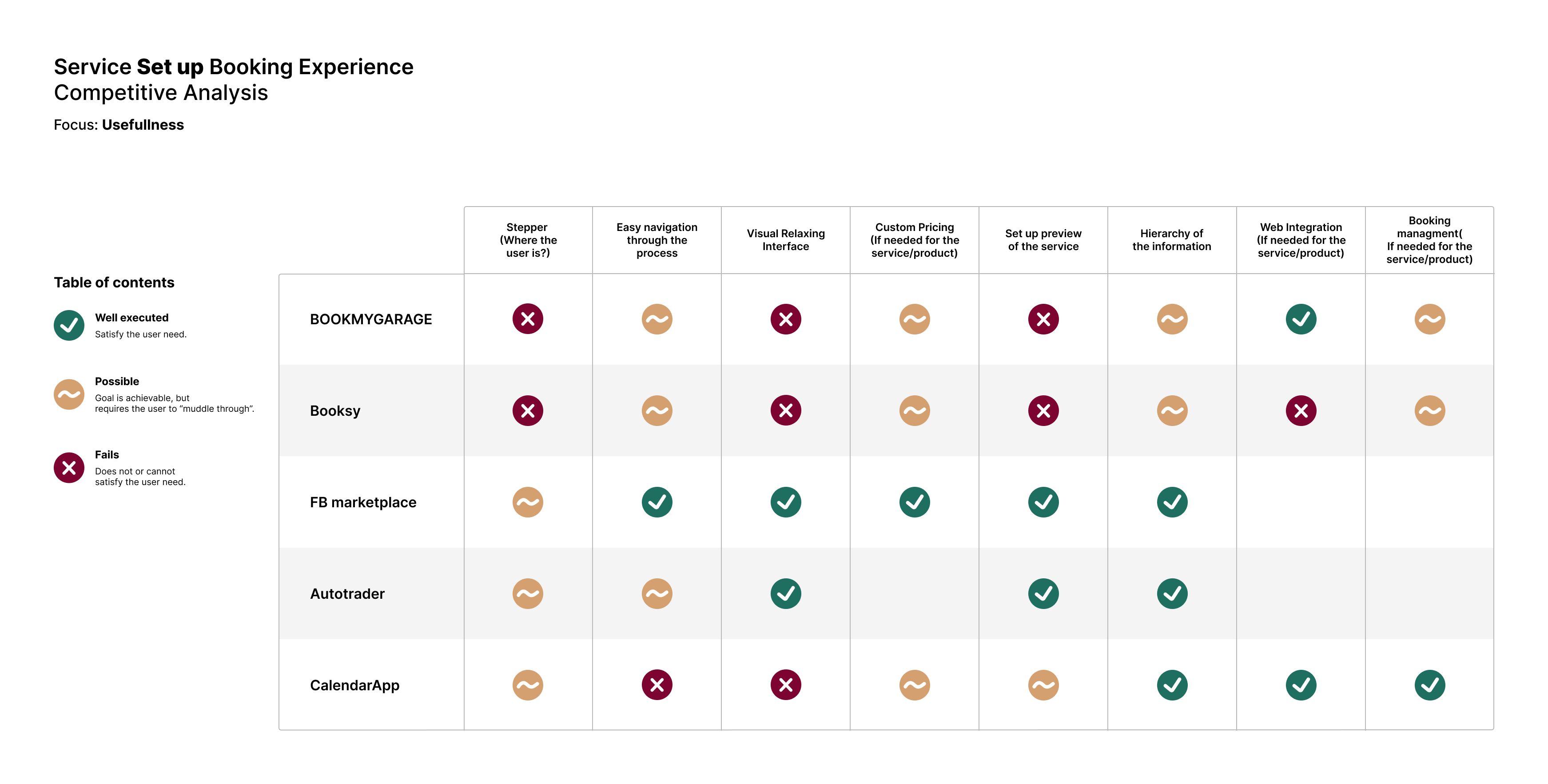
The Service Set Up of Booking Experience's competitive study has identified a number of areas where our platform can strengthen its position in the market and compete more effectively against other service booking platforms.
- Ease of navigation throughout the set up of the booking process, as many of our competitors have complex processes that can be difficult for users to complete.
- Provide our car dealers with custom pricing, as this is something that many of our competitors do not currently offer.
- Good hierarchy of information and having a better booking management tool, we can give car dealers more autonomy and better meet their needs, which is a key concern identified through interviews.
- Integration with their websites is important, as the tool must be easily accessible and integrated into their websites.
By focusing on these areas, we can improve our service set up booking experience and provide a more satisfying experience for our users.
As a result of the insights gained from the research, interviews, and competitive analysis, we developed our personas, which helped us construct our journey map.
Alongside my 2 product managers we prepared a list of questions and with the help of our customer service team, started recruiting dealers to interview with.
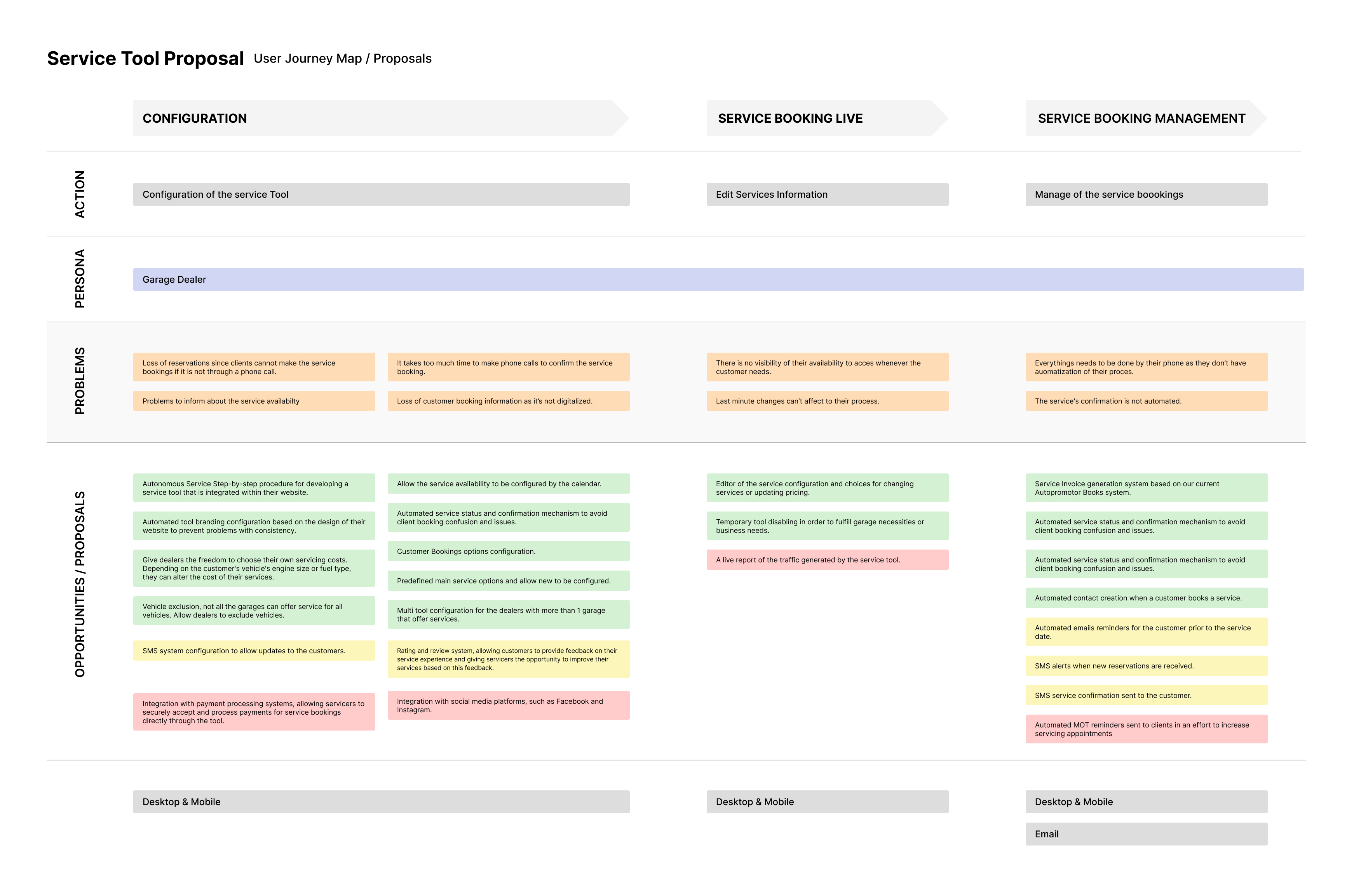
Following this, we defined the main flows and use cases of our service product. Keeping in mind that the two parts are interconnected. Our dealers setting up the online booking tool for our customers and the customer booking the service. Considering all of these points, we sat down with our Project Managers and the Tech Lead to identify potential problems and obstacles.
As soon as we had all the insights, and after talking to my Project Managers and Teach Lead, we developed the two main user flows for landing more ideas.
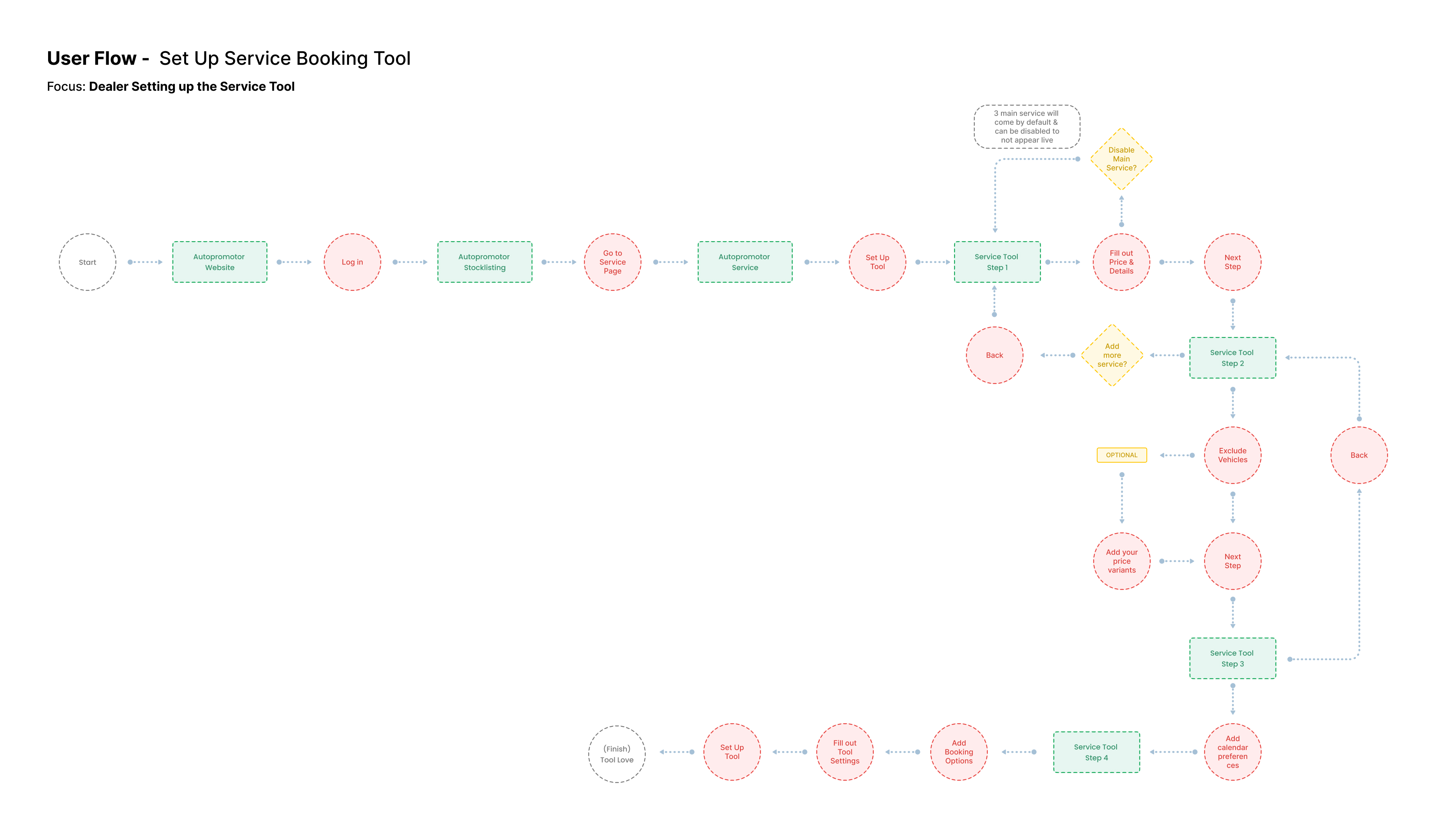
This first user flow (Set up Service Booking Tool) outlines the steps that the car dealer will follow in order to create the Service Tool.

The second user flow (Service Booking Experience) illustrates the customer's experience when booking a service for their car.
Based on the insights from the research, the interviews with users, and the user journeys and flows, the main directions of the design proposal were determined. Our principles can be divided into two categories:
Autopromotor Service Tool (Inside the platform):
1. Users need a dedicated Service Page on the Autopromotor platform.
2. There should be a clear step-by-step process for setting up the service tool that will be displayed on the garage website.
3. A custom price should be able to be calculated based on engine size or fuel type.
4. In order to review or modify the setup of their Service Tool, they need an editor.
5. To manage their service bookings, they need a Bookings page.
Service Tool (Embedded on their website):
1. A step-by-step process should be brief and concise for users.
2. Once the customer does the vehicle look-up, the Service Booking Tool will be open and displayed in another tab of their navigator.
3. Users should be able to choose their preferred booking time and option.
4. The dealer website settings will automatically define the colour and font preferences for the Service Tool.
5. A confirmation email must be sent to the customer once they have booked the service.
After taking all of this into consideration, I started out with a design proposal for a Service set up within the Autopromotor platform.
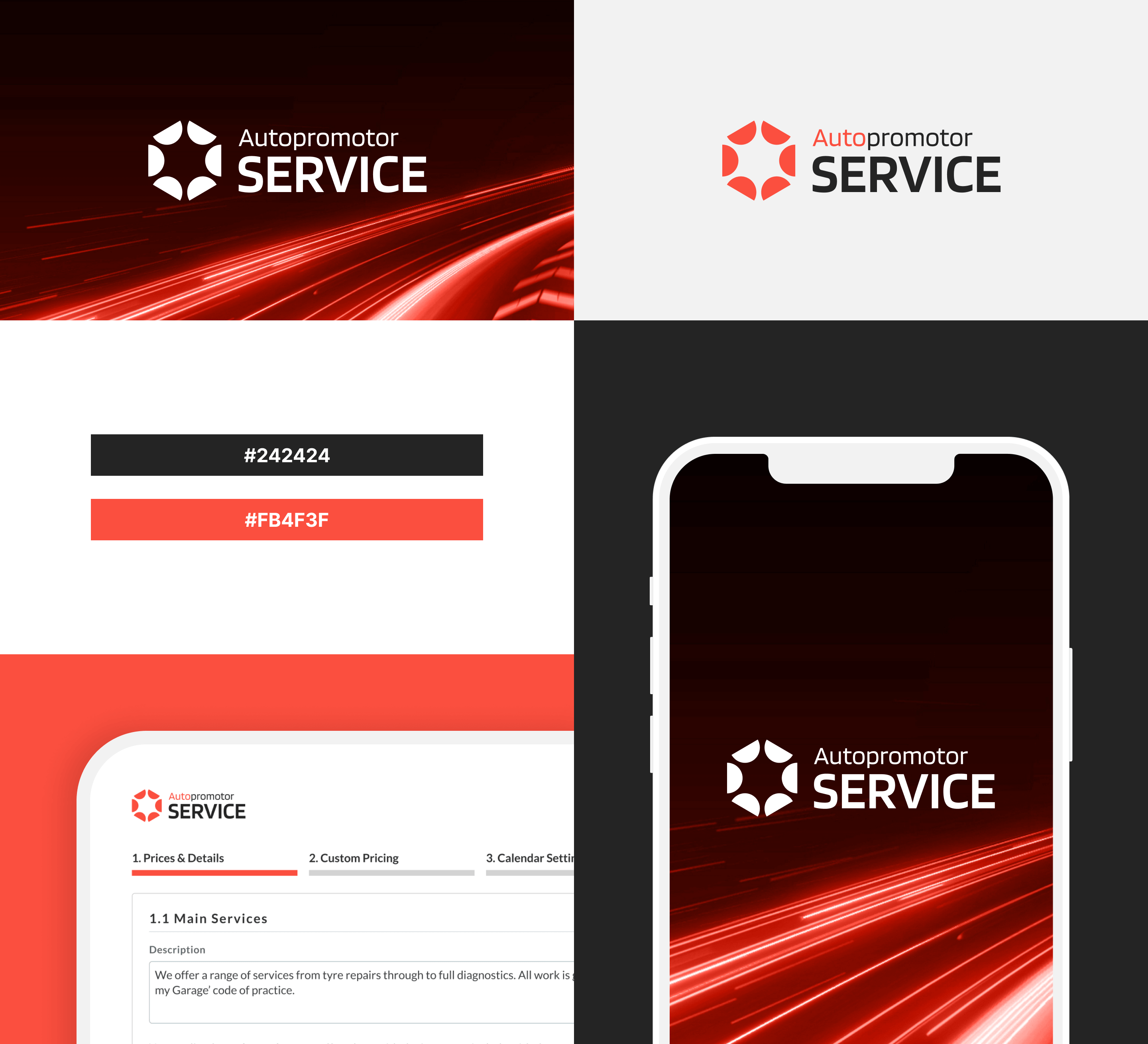
The first step was to create a new logo since this upcoming feature inside the Autopromotor platform would be called "Autopromotor Service". A logo was designed primarily for marketing purposes as well as to identify newly introduced features.
The new logo for Autopromotor Service perfectly captures the essence of this brand's new service. Our goal was to maintain the brand identity and name of Autopromotor, while emphasizing the services provided by the brand, creating this new feature section of Autopromotor.
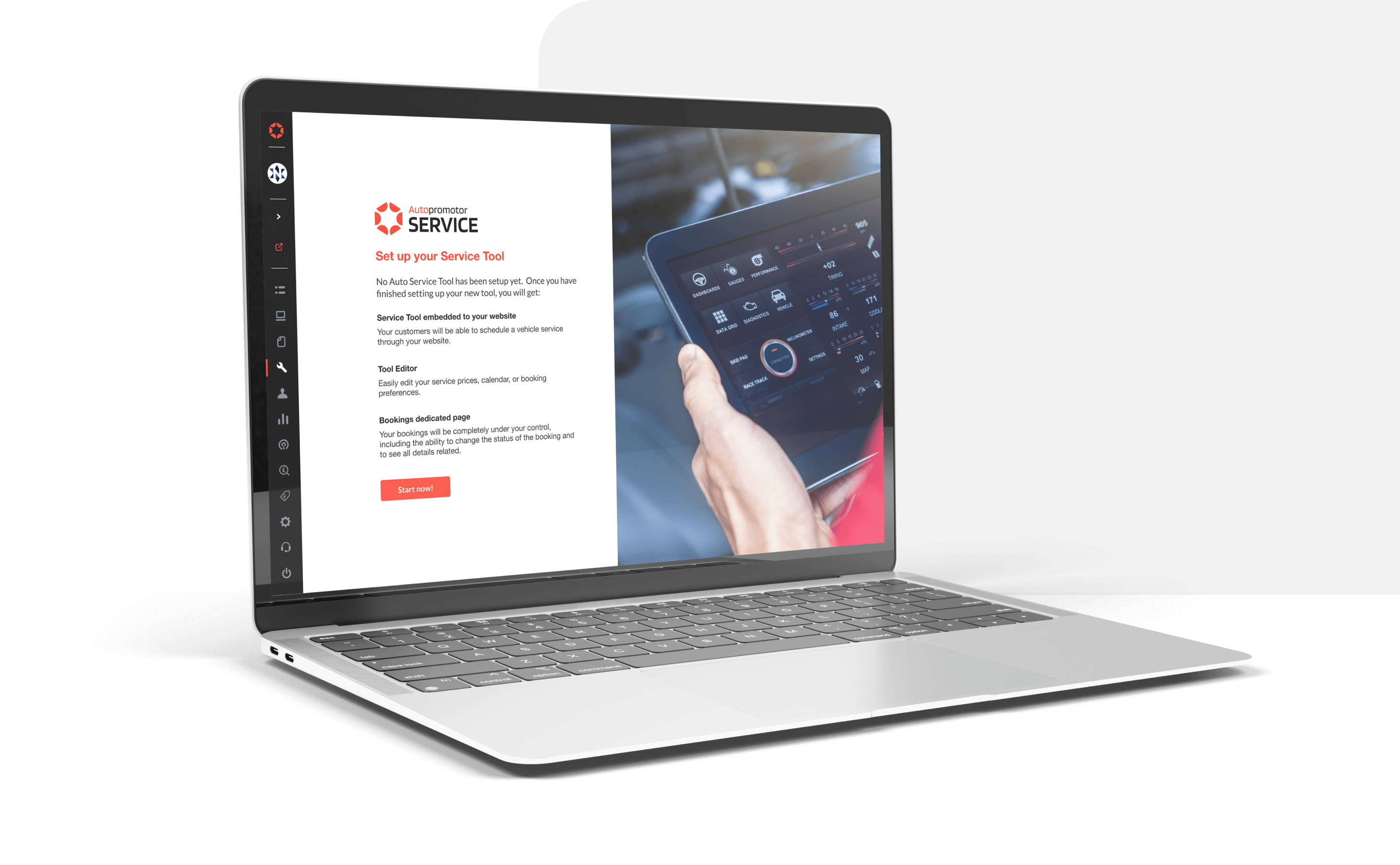
The Autopromotor platform uses Lato, which is a highly readable font perfect for body text and paragraphs. It is also very easy to embed into websites, ensuring consistent display across all platforms and devices.

Taking in mind the insights from the research we started drafting some ideas. We decided to divide the tool setup into 4 steps. Moreover, we created the Tool Editor, which has the same information as the step journey, but is structured as tabs, so they can navigate it easier and edit it more quickly.
As soon as we had created a prototype, we began testing it internally and with users with whom we had conducted interviews previously. We received very good feedback, both positive and constructive feedback, which allowed us to make improvements to the tool:
Positive:
- It was appreciated that the 4 step journey was straightforward and clear to the users.
- They appreciated the fact that the Service Tool had its own menu category.
- Calendar Settings was seen as a helpful tool for their business since previously they struggled to inform their customers of their availability and keep it up-to-date.
To improve:
- They would like the ability to deactivate services so they don't have to fill out the same information if they want to offer that service again.
- They like the idea of being autonomous, but they would like the customer support team to be accessible in case they need assistance.
- There was some uncertainty regarding the custom pricing as they felt they had to provide all the necessary inputs.
As a result of this feedback, we continue to iterate and focus on each step and try to improve small aspects that testers have mentioned, such as the deactivate option for the service or the custom pricing page.
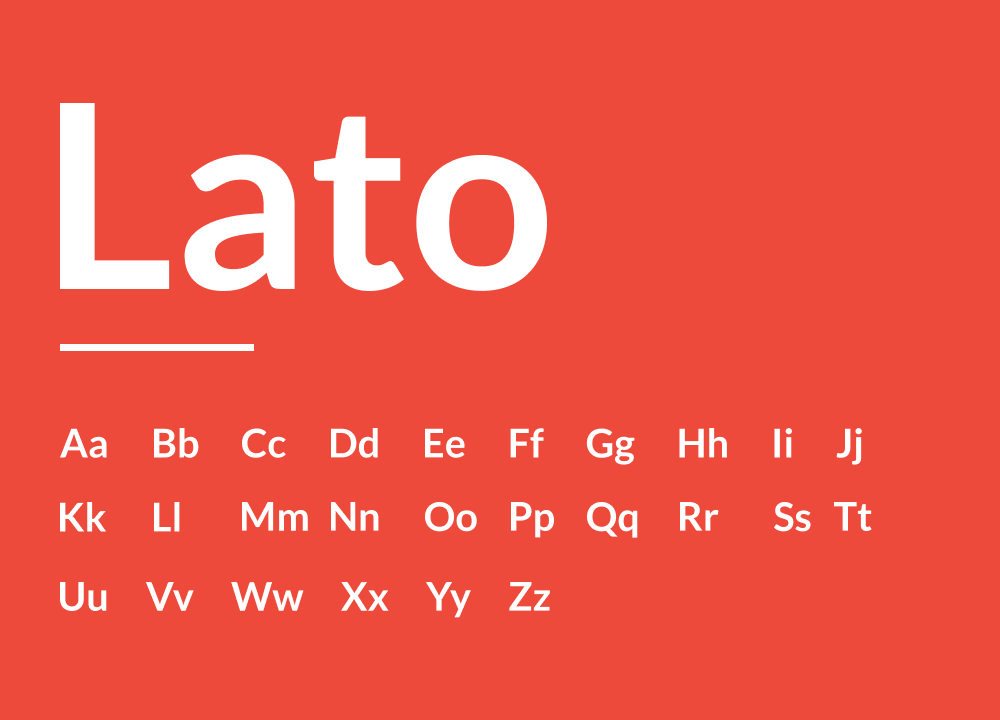
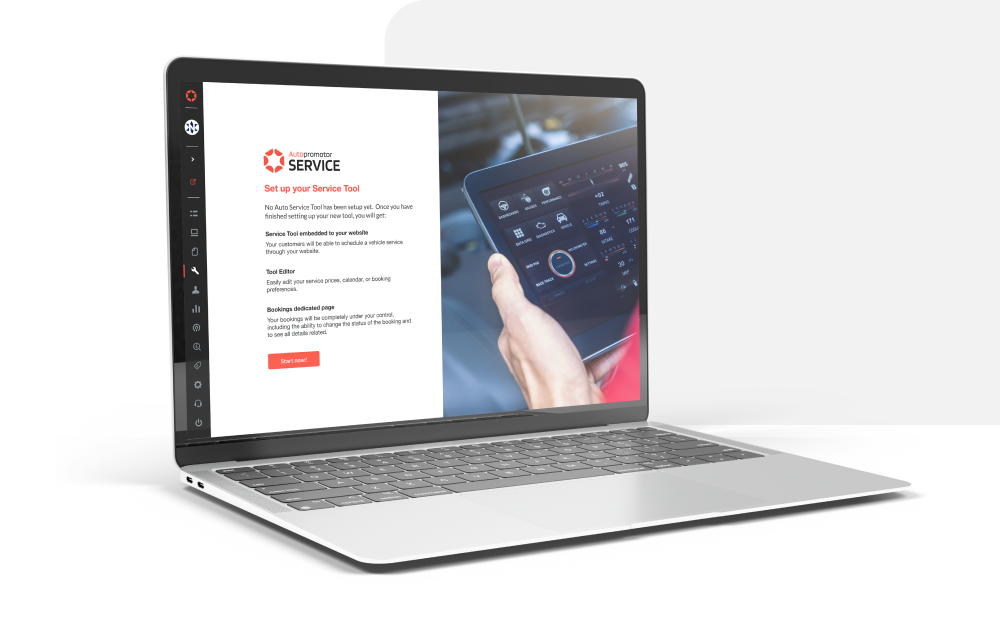
As soon as the dealer accesses the service page, a quick onboarding screen will display explaining what they will receive once their Service Tool is configured. By doing so, we will be able to assist our users in better understanding Autopromotor Service and empowering them with autonomy.
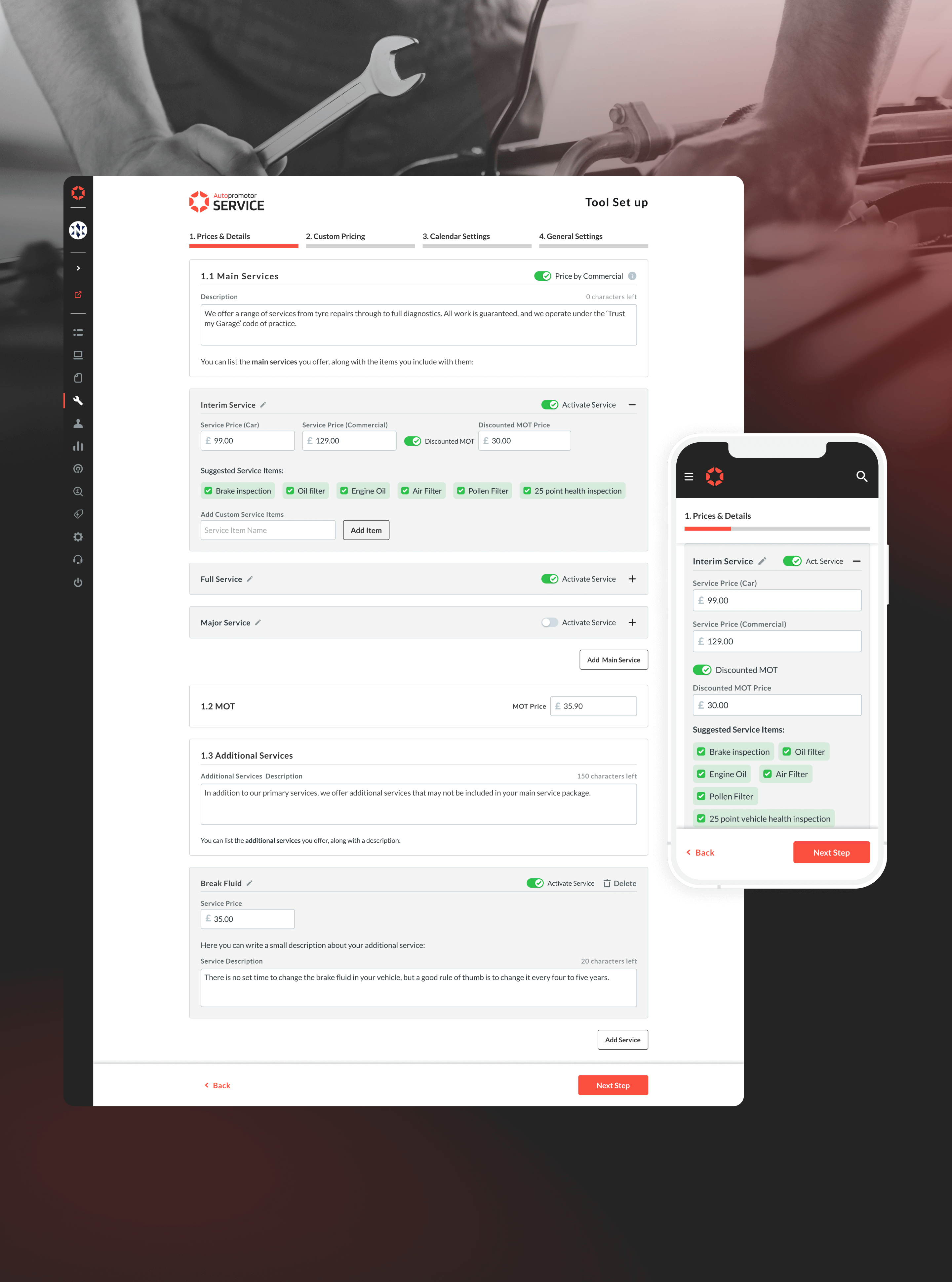
Their first step of the process will focus on setting up the price and details of their services. Our research and insights from interviews guided the structure of this page, which consists of main services, additional services, and MOT.

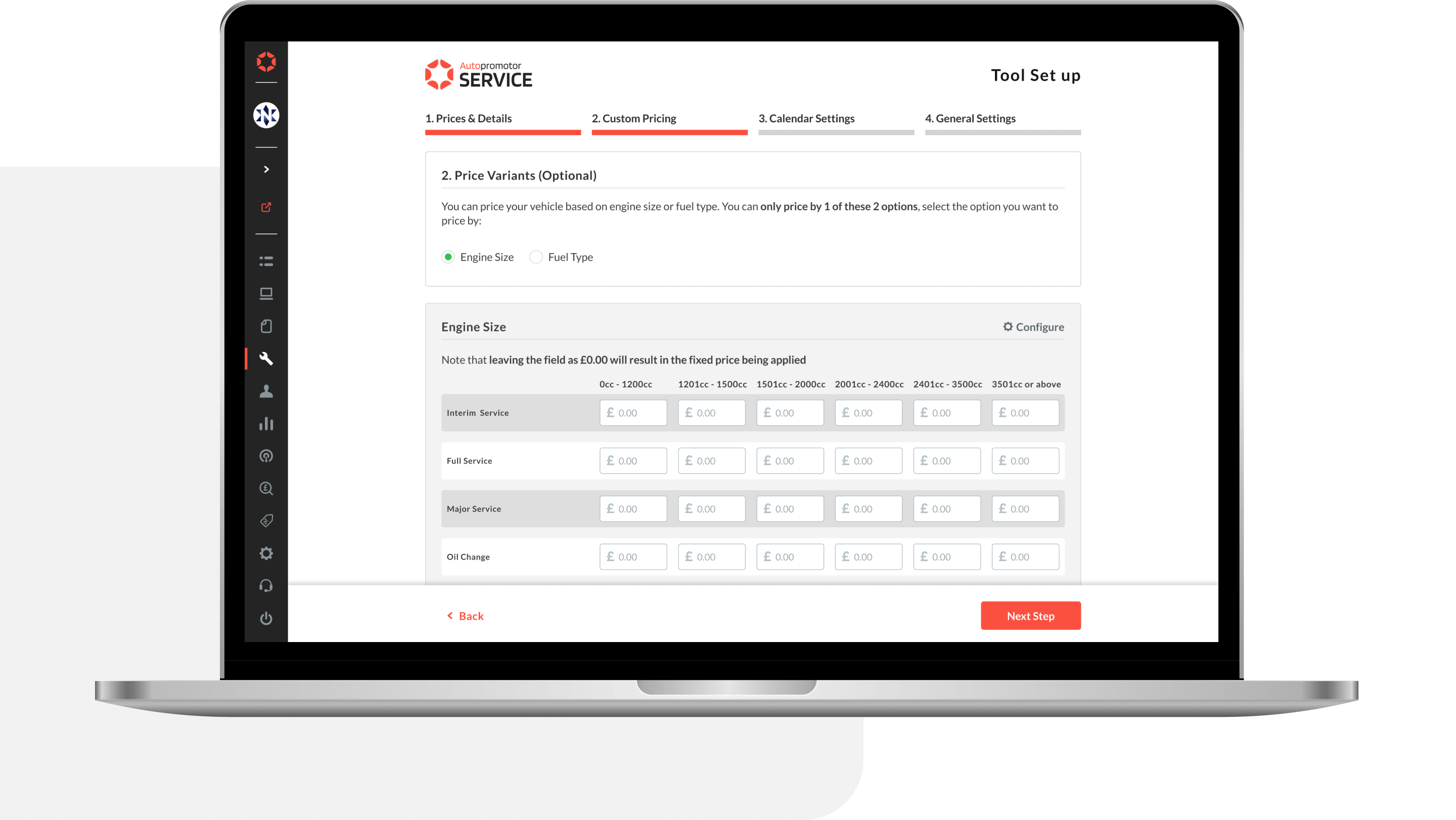
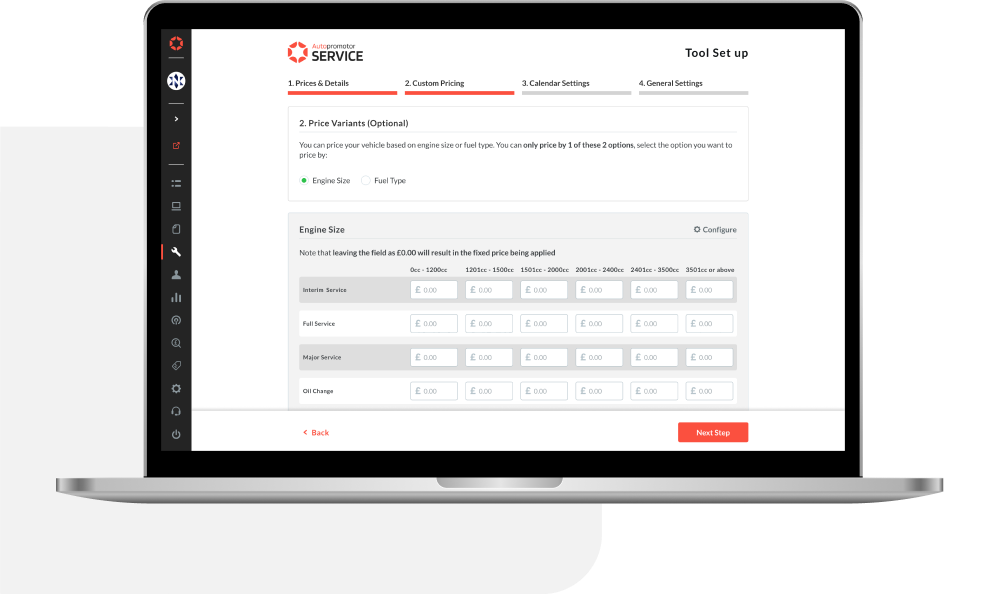
As one of the more complex pages, our dealers needed the ability to customize their pricing since they do not change the same price per vehicle service. According to dealer feedback, some dealers base their price on engine size, while others base it on fuel type. Therefore, in order to meet both user needs, we decided to provide both options, so users may choose the one that best meets their business requirements.
Calendar settings were required due to the nature of the tool. This was done so that customers would have access to opening hours and services, and so they could edit and inform their customers. Lead time days option is also available, because dealers required a way to establish lead times a few days in advance of the scheduled service date chosen by their customers.

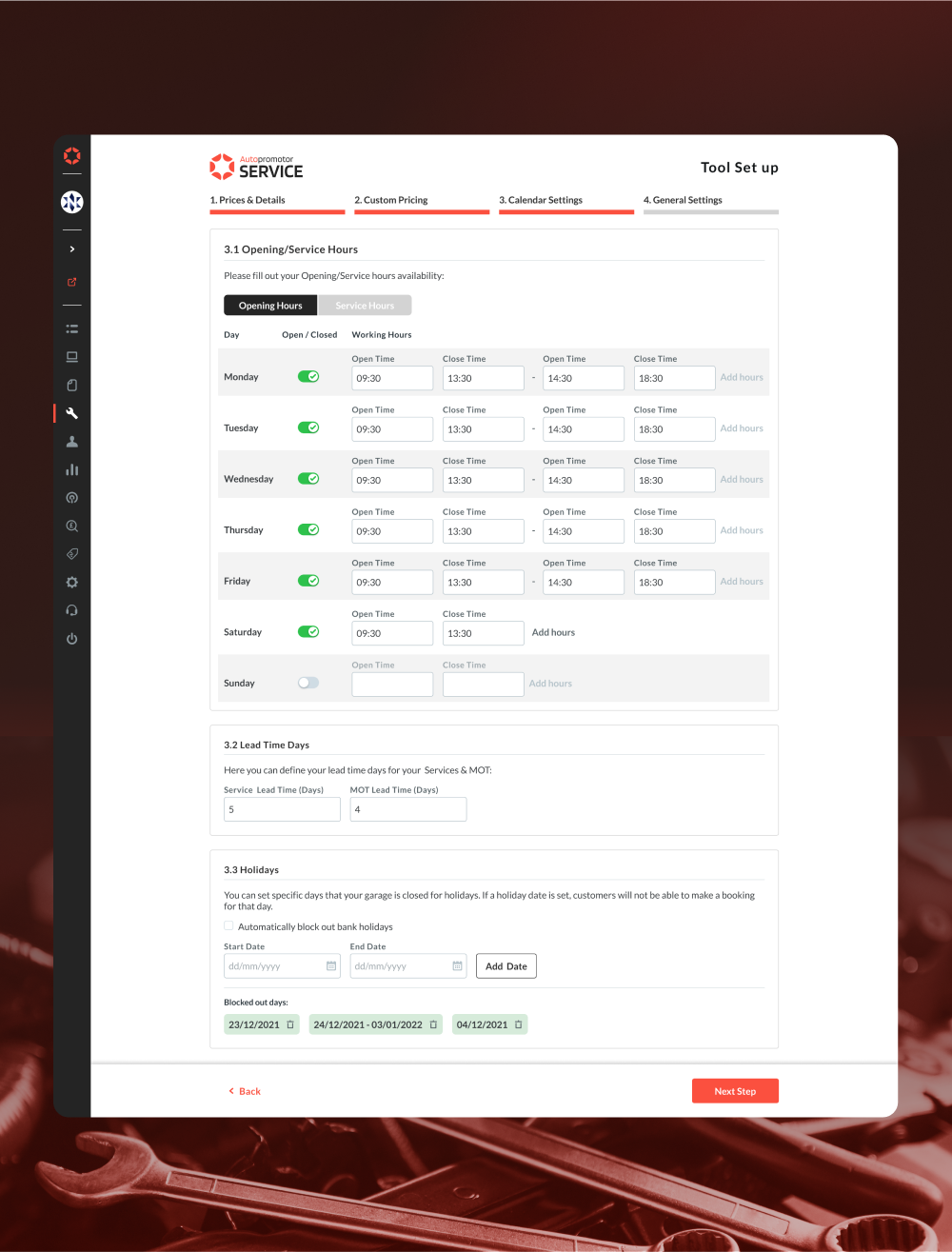
As a final step in the process, they are able to edit the text that appears on their homepage enquiry and confirmation text after the booking is complete, as well as the booking preferences they offer their customers.


The dealer will have access to the Tool Editor once they have completed the set up of the Service Booking Tool. There is a similar structure to the step-by-step process, however, they can navigate through and edit them more easily using tabs.


Additionally, they will have access to a dedicated bookings page, which will allow them to be in complete control of their bookings, including the ability to change the status of the booking and to see all related information.
In the end, the Service Tool live reflects what the dealership will set up on the Autopromotor platform, so we were working on prototypes for the Service Booking tool at the same time we were designing the Service Tool set up process. There will be a connection between the final design and the dealer website, as the colors and fonts will be the same.
We also tested it internally and with users with whom we had conducted interviews previously. We received a mix of positive and constructive feedback which enabled us to enhance the live Service booking tool.
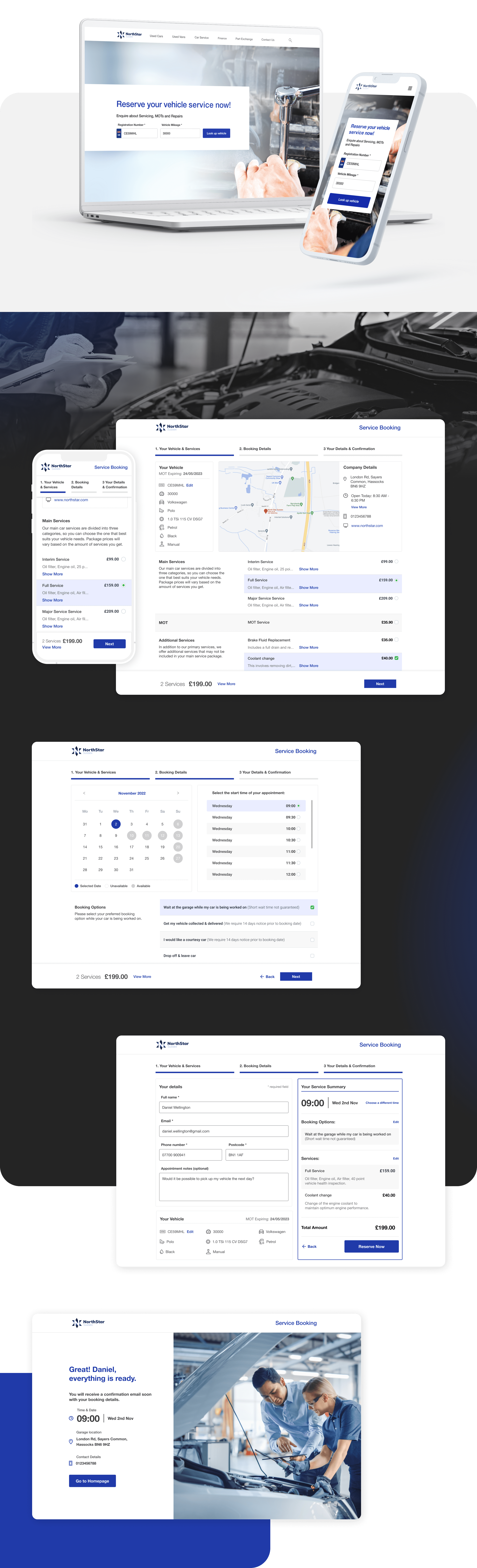
The Service Booking is divided into 3 steps:
Step 1 Your Vehicle & Services: Customers select the preferred services for their vehicles.
Step 2 Booking Details: The customer will select the date and time of the booking and the type of booking they would like to make.
Step 3 Your Details & Confirmation: The customer will be prompted to fill out a form in which their personal information will be requested, along with a summary of their vehicle information and the service selected.
Once they confirm the booking, they will get to a summary confirmation page and the confirmation in their emails.

Autopromotor Service has been implemented for our dealers in the UK, and the purchase rate has been remarkable. It has been reported to us by our support team that we have already reached 80 dealers with Autopromotor Service included. The tool has been highly appreciated by some dealers who report that it has increased their service bookings significantly, allowing their customers to schedule service at any time without the need for a phone call.
The importance now is to continue improving the tool. This is already in the works as we are looking into:
- Integration with payment processing systems, allowing dealers to securely accept and process payments for service bookings directly through the tool.
- Customizable booking and scheduling policies, such as minimum booking notice requirements, cancellation policies, and maximum booking lengths, to allow servicers to set rules and boundaries for their service bookings.
- MOT Expiry automated reminders. Once a customer's vehicle details have been saved into their database, the next MOT Expiry will automatically send an email to the customer to remind them to book their service.
The Autopromotor Service project has highlighted the importance of aligning the team and fostering strong communication between developers, designers, and product managers. By working closely together and sharing ideas and feedback, the team was able to create a product that effectively addressed the needs and challenges of our customers in the car servicing industry.
Related to the product design process, the project has highlighted the importance of validating designs with users, by engaging directly with our customers and gathering their feedback, we were able to refine and improve the design of the Service Tool, ensuring that it met the needs and expectations of our target audience. This emphasizes the importance of incorporating user feedback and testing into the design process, to create products that are truly user-friendly and effective.

